Knowledge
- Communications History
- Satellites History
- Learn about TVRO System
- Satellite Communications
- Antennas for Satellite Comm.
- Dish Installation Guide
- Polar Dish Mount
- Free to Air (FTA)
- Solar Outages
- TVRO Know-How
- C Band FAQ
- Ku Band FAQ
- Satellite Launch Centers
- Satellite Launch Infrastructure
- Satellite Launch Schedule
- Calendar of Satellite Events
- Space Debris
- Glossary of Satellite Terms
- Glossary of Launchers Terms
- Satellite Related Links

Read with Mobile
Camera Phone

Web Service
| We are adjusting our code of applications that require the "Google Maps" for the new API version 3.0. Some features available in our applications may not work properly. Soon we will be fully adapted to the new version of the API required by "Google". Hopefully understanding of our users for the inconvenience caused. |
Dear users, more online utilities are available here !
Degree Converter
To convert decimal to degrees, minutes and seconds you can just enter the data and we will convert for you.

Extract data from NORAD TLE
Use this free Excel spreadsheet to extract data from NORAD Two-Line Element format.
Day and Night in the World with Google Maps 
This Utility shows where is Day and Night in the World with Google Maps.
Find Latitude/Longitude with Google Maps
Find city Latitude and Longitude in the world with Google Maps.
Find Latitude/Longitude with World Cities List
Find Latitude/Longitude with World Cities List.
Find Magnetic Declination with Google Maps 
Find Magnetic Declination for any place on Earth with Google Maps. This utility uses World Magnetic Model for 2015-2020 published by the NGDC to calculate magnetic declination. Magnetic declination is the magnetic variation or the magnetic compass correction. It is the angle formed between true north and the magnetic north. Declination is measured positive east and negative west. For surveying practices, magnetic declination is the angle through which a magnetic compass bearing must be rotated in order to point to the true bearing as opposed to the magnetic bearing. Here the true bearing is taken as the angle measured from true North.
Find Elevation with Google Maps
The Elevation service provides elevation data for locations on the surface of the earth, including depth locations on the ocean floor (which return negative values). In those cases where Google does not possess exact elevation measurements at the precise location you request, the service will interpolate and return an averaged value using the four nearest locations.
Find a Route with Google Maps
Find a route from a place to other with Google Maps.
Find the International Space Station (ISS) with Google Maps
Shows you where the International Space Station (ISS) is currently located. Uses the NORAD TLE sets. Try it !
Sound and Image direct from ISS
Shows you sound and image direct from International Space Station (ISS). Try it !
List of Rocket Launch Centers with Google Maps
Shows where the satellite launch centers are currently located. This utility require Google Map or Google Earth. Try it !
Free Space Loss
The Ku-band satellites are located on the same arc as the C-band satellites, so the distances from earth to the satellites are essentially the same (22245 miles or 35800 Kilometers). But because the frequency is so much higher on Ku-band than it is on C-band, the transmitted power path loss for the Ku-band satellites is much higher. Use this free Space Loss calculator and get space loss in dB.
Generate Clarke Belt Snapshot
Generate yourself a "Clarke Belt Snapshot" with the latest satellite longitudes. This is a experimental utility. It convert geostationary Two-Line Elements file into a satellite longitudes table with satellite longitude and inclination. This utility requires only TLE file from CELESTRAK or NASA. The satellites position are obtained using the NORAD SGP4/SDP4 prediction models.
Great Circle Distance
This calculator computes the great circle distance between two points on the earth's surface. The program is operated by entering two geographic points and then pressing the "Calculate" button. The entry form allows you to enter geographic position. The calculator computes distance in Statute Miles, Nautical Miles and Kilometres. Enter latitude and longitude of two places, and find out the distance between them.
Dish Alignment Calculator using Google Maps
It is the most practical and compact than competitors. This utility detects the city where you are. It shows on screen the latitude, longitude and magnetic declination of the site. You can calculate at once the azimuth, azimuth magnetic, elevation and LNB skew from your city. You can improve the accuracy of the results by putting the mark on your home. TrackingSat has proven to be a great tool. It is one of the most visited pages on our website. Try it.
Satellites in Clarke Belt
See this list and have more details about the desired satellite.
Sunrise and Sunset
The program retrieves the current date from your computer, and fills the month, day and year fields. To perform calculations for a different date, simply select a month in the pull down menu, and enter the day and four digit year in the appropriate input boxes. When entering a day or year, you will need to click the "Calculate Sunrise/Sunset" button to update the results for this date.
Timezone Clock
The Interactive world time zones clock calculates the time around the globe. The clock is based on your computer's time and time zone settings so these must be correct in order to get accurate time conversions.
Timezone Map
Found time zone from your country.
HF Propagation Tools and Solar Data
Click to add Solar-Terrestrial Data to your website.
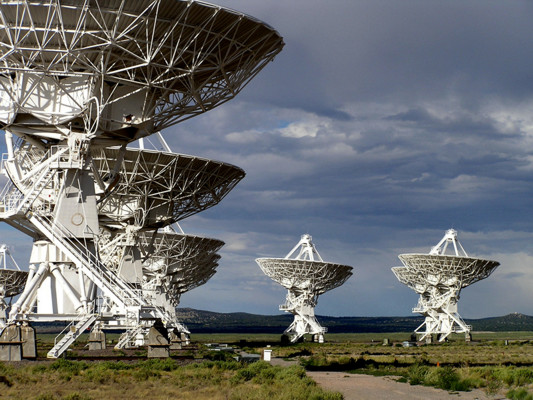
Antennas located at the NRAO site in Socorro, New Mexico
Want to exchange links with us ?
- Copy and paste the code below onto your site.
- Send me your website info and the URL with the reciprocal link.